A Mac app for your assistant config
See everything Claude Code loads — and what you actually use
Loadout is a Claude Code skills manager for Mac. Browse skills, subagents, slash commands, plugins and MCP servers in one place. Review recorded skill usage, then edit or disable the configuration you no longer need.
Free, and stays free. Like it? Buy me a coffee ☕
- Free · MIT
- Requires macOS 15
- Signed and notarised
- No account, no telemetry
A skills manager for Claude Code, Codex and OpenCode
Claude Code
~/.claude/skills
Codex
~/.codex/skills
OpenCode
~/.opencode/skills
Anything else
~/.<assistant>/skills
Skills are an open format now. Loadout finds an assistant by the folder it keeps its skills in, so one installed tomorrow shows up without a new version of this app.
Manage every Claude Code skill you have installed, in one list
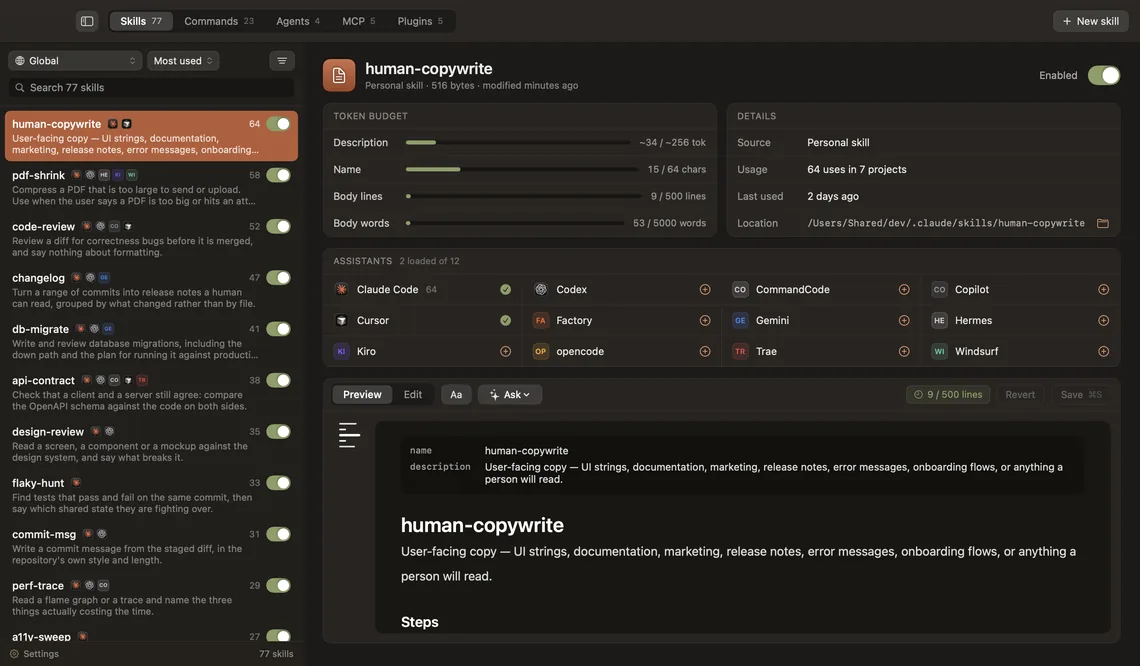
You added them one at a time over six months. A few of your own, forty from plugins, some you cloned and forgot. Here they all are: name, what each one is for, where it came from, and whether it is on. Searchable, sortable, and scoped to a project when you need to ask what an assistant sees if you open that folder.
Personal, project and plugin
Everything under ~/.claude, everything a plugin brought with it, and everything in the repository you are standing in.
Disabled without deleting
Turning a skill off moves its folder to ~/.claude/skills-off. It stops loading; nothing is lost.
The raw file, right there
Frontmatter, body, token budget and the limits it is measured against, not hidden behind a form.
Usage counts, mined from your own sessions
Loadout reads supported assistant session logs and shows recorded skill activations, last use and projects. Claude Code also has a built-in /skill-doctor report on supported versions. Loadout keeps the inventory and editor together in a Mac app; missing history is a reason to investigate, not proof that a skill is useless.
- configuration types
- 5skills, commands, subagents, MCP servers, plugins
- days by default
- 90or index the whole history in one go
- skill usage fields
- 4total uses, last use, projects, per assistant
- guessed numbers
- 0a format that cannot prove a use says so
When a history format cannot prove an activation, Loadout marks it unsupported rather than printing a zero that reads like disuse.
Turn an MCP server off without deleting it
Loadout is an MCP server manager for Mac. Browse configured servers and turn off the ones you do not need while keeping their definitions. Claude Code also offers an on/off control in /mcp. Context cost depends on tool-search settings, so disabling a server does not promise a fixed token saving.
Keep the setup for later with the Claude Code MCP disable guide, or follow the MCP removal guide to delete a definition.
- Global servers from ~/.claude.json, and the per-project ones
- Review each server and its configuration before deciding what to keep
- Off is a switch, not a hand-edit of a JSON file at midnight
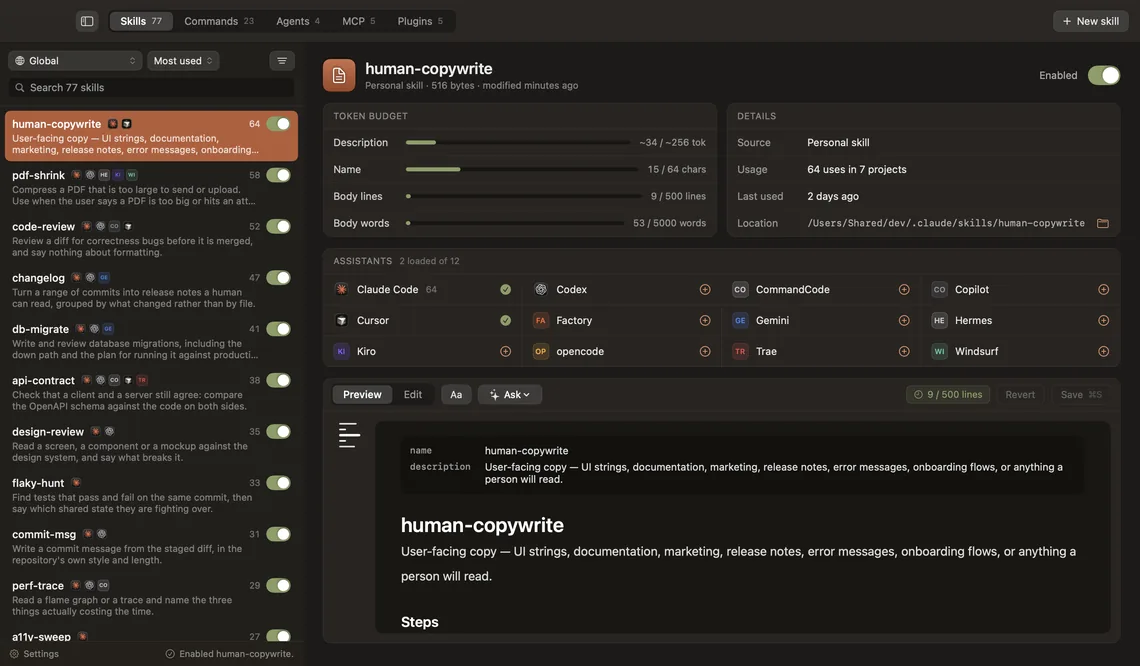
Example: turning a skill off and back on in Loadout.
Subagents, slash commands and plugins you forgot you wrote
Browse skills, subagents, slash commands and plugins in the same app. Available actions and usage evidence depend on the item and assistant.
Personal, project and plugin skills
Create one from a template, edit the frontmatter with live validation against the documented limits, or move it out of the way.
Your configured subagents
Find your Claude Code subagent definitions, read their instructions and edit the ones you own.
Your custom slash commands
Find the commands you wrote and inspect what each one asks your assistant to do.
Plugin manager: what a marketplace installed, and how to remove it
Which marketplace it came from, what it brought with it counted by type, and the folder it occupies. Remove one and it leaves Claude Code’s registry, your on/off answer leaves settings, and the folder goes to the Trash — after a backup. The marketplace stays, because other plugins come from it.
An editor, not a viewer
Syntax highlighting, a token budget as you type, and validation that refuses to write a file it knows is broken.
A conversation beside the document
Ask claude, codex or opencode to improve a skill. It works in a copy; you accept or reject each change, one at a time.
Four things, in order
Every assistant folder that exists on the machine, plus the repository you point it at. Nothing is registered, nothing is imported: the files on disk are the state, and a change made outside the app shows up without a reload.
Your assistants already write a transcript of every session. Loadout reads them incrementally, skipping any file whose size and date have not moved, and counts what actually fired, in which project, and when.
Before any write, move or delete, a copy goes to Application Support. If the copy fails, nothing is written. Deleting goes to the Trash; it is never rm.
Give a skill to a second assistant and the folder is promoted to ~/.agents/skills, with a symlink from each. One copy, one edit, both sides always the same. If two assistants already have their own different copies, the app refuses to merge them and says why.
Where it reads from, and what it writes
The whole app is a careful reader of files you already have. This is the entire surface.
| Data | Where it lives | Written by Loadout? |
|---|---|---|
| Skills, commands, subagents, MCP servers | ~/.claude/, ~/.codex/, ~/.<assistant>/ | Only when you save, create, delete or share |
| Session logs, for the usage counts | ~/.claude/projects/, ~/.codex/sessions/ | Never, read only |
| Backups, taken before every write | ~/Library/Application Support/Loadout/backups/ | Yes |
| Usage index, rebuildable at any time | ~/Library/Application Support/Loadout/usage.sqlite | Yes |
| Working copies for the Ask conversation | ~/Library/Application Support/Loadout/ask-workspaces/ | Yes |
Loadout keeps its own files out of ~/.claude. That directory belongs to Claude, and an app that stores its database in someone else’s folder is a surprise waiting for whoever wipes .claude to fix something.
A real Mac app, not a browser tab
Loadout is a Claude Code manager Mac app written in SwiftUI. It opens instantly, uses the keyboard, and does not ship a browser to draw a list. If you came here looking for a Claude Code GUI on Mac, be clear about what this is: it manages what your assistants load, and leaves running them to the terminal you already have open.
Local configuration, no telemetry
Browsing and editing configuration happens on your Mac, with no account or telemetry. Loadout checks GitHub for updates. When you use Ask, the assistant CLI sends the conversation and skill content it needs to its configured provider.
Free and open source
Loadout is a free, open source Claude Code skills manager under the MIT licence. No paid tier, no trial, no account. The whole thing is on GitHub: read it, fork it, file an issue when it gets something wrong.
Frequently asked questions
Personal skills live in ~/.claude/skills, one folder per skill with a SKILL.md inside. Project skills live in .claude/skills in the repository. Plugin skills come from ~/.claude/plugins/cache. When the same name exists in two of them the personal one wins, not the project one. Loadout reads all three and shows which is which.
Yes. Turn it off in the MCP list to preserve its definition for later. In Claude Code itself, open /mcp and turn the server off there. The guide explains project scope and session-only options.
Loadout reads the session transcripts your assistants already write and counts real activations per skill, along with when each one last fired and how many projects it fired in. Sort the list by uses and the unused ones collect at the bottom.
Your skills, slash commands and subagents, plugin caches, settings, and a transcript of every session under projects/. Loadout gives all of it a window instead of a find command.
Review recorded usage and missing history before removing a skill. Turn it off first if you are unsure. Loadout backs up writes and moves deleted items to the Trash. In Claude Code, /skill-doctor reports skill usage on supported versions, and /skills lets you change visibility.
Run claude plugin uninstall <plugin>@<marketplace> from your shell and select the intended scope. Current Claude Code documents delayed cache cleanup and deletion of persistent data on the last-scope uninstall unless you use --keep-data. Check the guide before removing anything you need.
Their context cost depends on tool search: deferred tools do not all load their full definitions upfront. Check /context in your session before estimating savings. Disable servers to control what is available.
Loadout is a native SwiftUI app for managing what Claude Code loads: skills, subagents, commands, plugins and MCP servers. It is not a replacement for the terminal: you still run Claude Code the way you always have.
Yes. It finds an assistant by the skills folder it keeps (~/.codex/skills, ~/.opencode/skills, and so on), so an assistant installed tomorrow appears without an update. A skill can be shared across all of them as symlinks to a single copy.
With Homebrew, run brew install --cask migsilva89/loadout/loadout. Otherwise download the disk image from GitHub and drag Loadout to Applications — the tap pours that same disk image, so either way you get the build that is signed with a Developer ID and notarised by Apple, and it opens without a Gatekeeper warning. macOS 15 or later. It is not in the Mac App Store.
Yes. Loadout is free and open source under the MIT licence. There is no paid tier, no trial, no account and nothing to sign up for. You download the app, open it, and it reads the setup you already have.
Browsing and editing are local, and Loadout has no telemetry. It contacts GitHub for updates. If you choose Ask, your installed assistant CLI communicates with its configured provider and may send skill content and conversation data.
The questions underneath, answered properly
Everything Loadout does starts with a folder on your disk. These explain what is in them, in case you would rather do it by hand.
- Where Claude Code skills are storedPersonal skills live in ~/.claude/skills, project skills in .claude/skills, plugin skills inside the plugin. All four levels, the Windows path, which wins.
- Where Codex CLI skills are storedFind Codex CLI skills in .agents/skills at user and repository scope, check older .codex/skills setups, and disable a skill without deleting its files.
- How to find the Claude Code skills you never useUse /skill-doctor to find Claude Code skills with no recorded usage, check missing history, and turn skills off before deciding what to delete.
- Claude Code skill usage counts: where they liveFind Claude Code skill usage with /skill-doctor, or inspect the skillUsage counters in ~/.claude.json. What recorded counts can and cannot tell you.
- What /checkup cleans up, and what it leaves behindThe /checkup command is an alias of /doctor. Review its setup findings, understand proposed skill and permission changes, and use /skill-doctor for usage.
- How to disable an MCP server in Claude CodeDisable an MCP server in Claude Code without deleting its configuration. Use the /mcp toggle, or choose which servers a single session loads.
- How to remove an MCP server from Claude Codeclaude mcp remove deletes the entry, but only in the scope and directory you run it from. What the command leaves behind, and how to check the server is gone.
- How to uninstall a Claude Code pluginThe /plugin uninstall command, the four places a plugin lives, why the files stay on disk, and the scope mistake that makes an uninstalled plugin come back.
- What is inside the ~/.claude folderWhat is taking the space in ~/.claude, what Claude Code already deletes for you after 30 days, what it never touches, and how to purge one project safely.
Find out what you have been carrying
Download the latest release, drag it to Applications, and open it. It reads your setup and tells you what is in it.
Version 0.6.2 · 6.8 MB
macOS 15 or later. Free, MIT, and the source is on GitHub.